
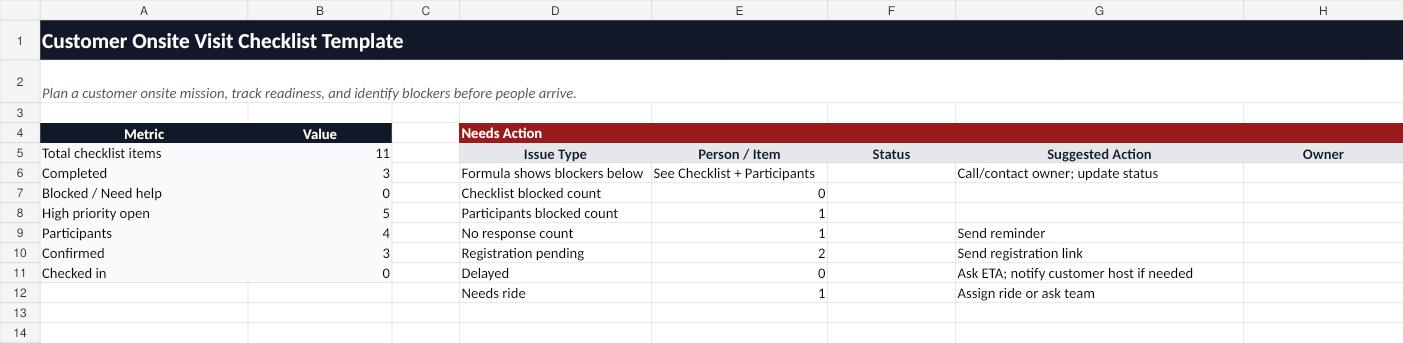
Use this free customer onsite visit checklist template to plan a customer site visit, prepare participants, track registration status, and identify issues before people arrive onsite.
Who this template is for
This template is designed for hosts who need to coordinate customer onsite visits involving sales teams, solution engineers, field specialists, implementation leads, external experts, vendors, or partners.
It is especially useful when the customer site requires participants to arrive at a specific time, complete visitor registration, bring identification, check in at security, or follow special site instructions.
What is included
The workbook includes:
- Mission Info — customer site name, address, mission host, customer host, arrival time, meeting point, visitor registration link, and access instructions.
- Checklist — pre-visit actions, owners, due dates, priorities, status, and next steps.
- Participants — attendance, ETA, visitor registration status, arrival status, transport status, and issues.
- Dashboard — summary metrics and a Needs Action section for missing or blocked items.
- How to Use — instructions for using the spreadsheet and when to switch to a live mission board.
How to use the template
- Fill in the customer site address, required arrival time, meeting start time, meeting point, customer host, and mission host.
- Add each participant to the Participants tab with their company, role, email, and current status.
- Use the Checklist tab to track registration, access, transport, instructions, and day-of check-in tasks.
- Update status fields as people confirm attendance, submit ETA, complete registration, go on the way, arrive, or check in.
- Use the Dashboard tab to find missing confirmations, blocked participants, delayed arrivals, or open high-priority checklist items.
Spreadsheet limitations
A spreadsheet is a good starting point for planning. But it becomes difficult once the visit becomes live.
Spreadsheets do not provide:
- Participant magic links.
- Mobile check-in buttons.
- Automatic reminders.
- Real-time blocked-at-security alerts.
- A Host action queue.
- A simple way for participants to update their own status.
When to use OnsiteMission instead
Use the spreadsheet for planning. Use OnsiteMission when you need a live mission board.
OnsiteMission lets a host create a customer onsite mission, invite participants by email, share site instructions, and track who is confirmed, registered, on the way, arrived, checked in, delayed, or blocked.
FAQ
What is a customer onsite visit checklist?
A customer onsite visit checklist is a planning tool that helps a host prepare a customer site visit by tracking the site address, customer contacts, participants, visitor registration, ETA, check-in status, and unresolved issues.
Can I use this template instead of visitor management software?
Yes, for simple planning. But visitor management software is usually owned by the customer site. This template is for the visiting team or mission host who needs to coordinate participants before and during arrival.
When should I use software instead of a spreadsheet?
Use software when multiple companies are involved, participants need to update status themselves, or the host needs live visibility into who is confirmed, delayed, checked in, or blocked.