
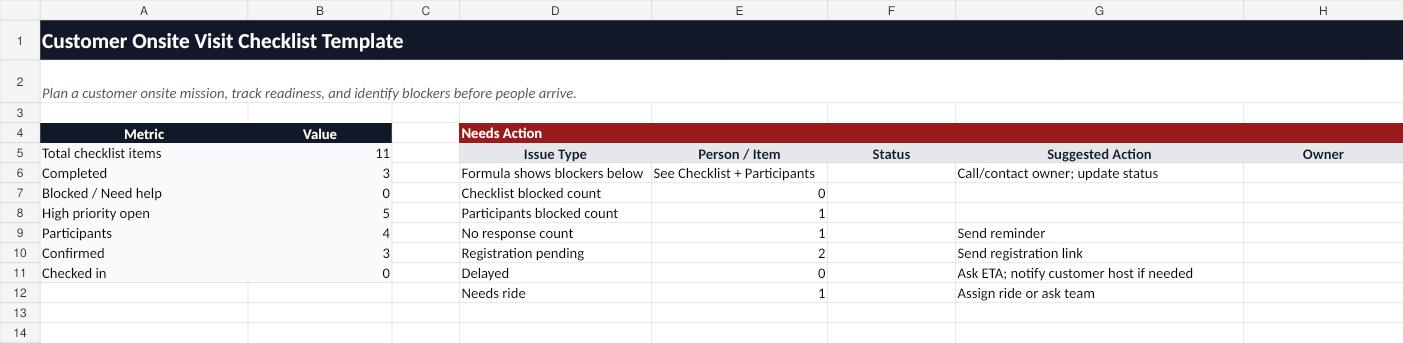
Use this free onsite meeting check-in tracker template to track who is confirmed, on the way, arrived, checked in, delayed, or blocked during a customer onsite mission.
Who this template is for
This template is for hosts coordinating onsite meetings where participants come from different teams, companies, vendors, or partner organizations.
It is useful when the host needs to know who is already onsite, who is still on the way, who is delayed, and who needs help at security or reception.
What is included
The workbook includes:
- Mission Info — site address, meeting point, customer host, mission host, registration link, and instructions.
- CheckIn — participant attendance, ETA, registration status, arrival status, transport, and help issues.
- Live Board — day-of summary and Needs Action section.
- How to Use — workflow instructions.
How to use the tracker
- Add each participant to the CheckIn tab.
- Record attendance, ETA, registration status, transport status, and arrival status.
- During the onsite mission, update each participant as On the way, Arrived nearby, At meeting point, Checked in, Delayed, or Blocked / Need help.
- Use the Live Board to see who needs immediate action.
Spreadsheet limitations
A static spreadsheet does not work well during a live onsite meeting if participants are moving around.
It does not provide:
- Mobile status update buttons.
- One-click “Need help” alerts.
- Magic links for external participants.
- Automatic reminders.
- A live Host dashboard.
When to use OnsiteMission instead
Use this template to plan the check-in process. Use OnsiteMission when people are on the way and the host needs live status updates.
OnsiteMission gives each participant a private link to update their own status from a phone.
FAQ
What is an onsite meeting check-in tracker?
An onsite meeting check-in tracker helps a host track who has confirmed attendance, who is on the way, who has arrived, who has checked in, and who is blocked or delayed.
Why not just use a shared spreadsheet?
A shared spreadsheet can work for planning, but it is hard to use during arrival because participants may be on phones, in taxis, at reception, or dealing with security issues.
What statuses should I track?
Track Confirmed, ETA, Registration status, On the way, Arrived nearby, At meeting point, Checked in, Delayed, and Blocked / Need help.