
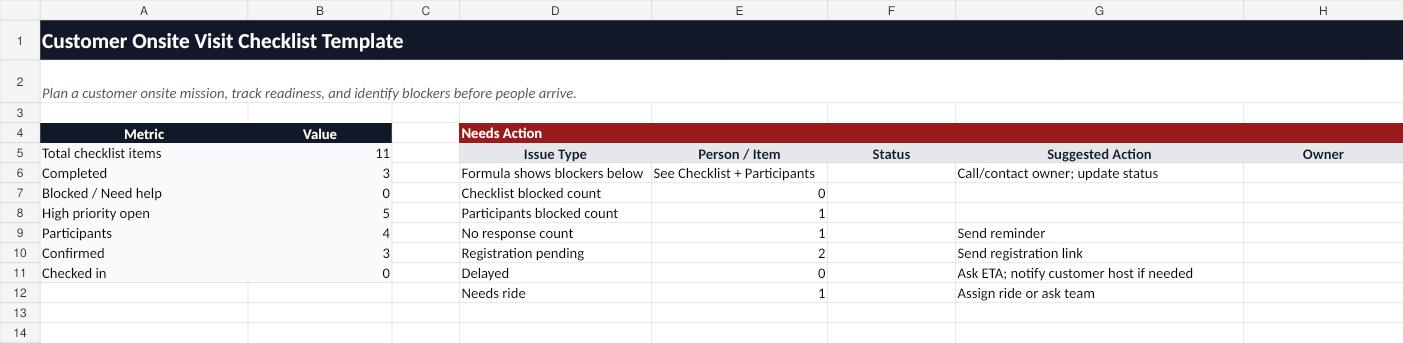
Use this free field implementation visit checklist template to prepare an onsite implementation, go-live, site acceptance visit, or customer field visit.
Who this template is for
This template is for implementation leads, solution engineers, field specialists, project coordinators, and customer success teams preparing for customer onsite implementation work.
It is useful when the visit includes access requirements, customer host coordination, implementation readiness, validation criteria, equipment, technical setup, and participant check-in.
What is included
The workbook includes:
- Mission Info — customer site address, arrival time, host contacts, access instructions, and registration link.
- Checklist — implementation readiness across pre-visit, arrival, access, implementation, validation, and wrap-up phases.
- Team — participants, attendance, ETA, registration, arrival status, and help issues.
- Dashboard — blocked and at-risk items, high-priority open issues, team check-in status.
- How to Use — practical instructions.
How to use the checklist
- Fill in customer site information, host contacts, arrival time, and site access instructions.
- Use the Checklist tab to track pre-visit, access, implementation, validation, and wrap-up readiness.
- Use the Team tab to track who is confirmed, registered, on the way, checked in, delayed, or blocked.
- Use the Dashboard to see blocked items and high-priority risks before the visit begins.
Spreadsheet limitations
A field implementation visit often changes quickly once people are moving toward the customer site. A spreadsheet can document readiness, but it does not provide live status updates.
Common spreadsheet gaps include:
- No participant magic links.
- No mobile check-in buttons.
- No live “Need help” alerts.
- No action queue for the host.
- No easy way to know who is blocked or delayed in real time.
When to use OnsiteMission instead
Use the spreadsheet for planning. Use OnsiteMission when you need live field readiness, participant check-in, blocked-at-security alerts, and a Host action console.
FAQ
What is a field implementation visit checklist?
A field implementation visit checklist helps a team prepare for onsite customer implementation work by tracking access, people, equipment, technical readiness, validation criteria, and arrival status.
What is the difference between planning and live coordination?
Planning happens before the visit and can often be done in a spreadsheet. Live coordination happens during arrival and check-in, when the host needs real-time updates from participants.
When should I use a live mission board?
Use a live mission board when participants are coming from different companies or locations and the host needs to know who is confirmed, on the way, checked in, delayed, or blocked.