
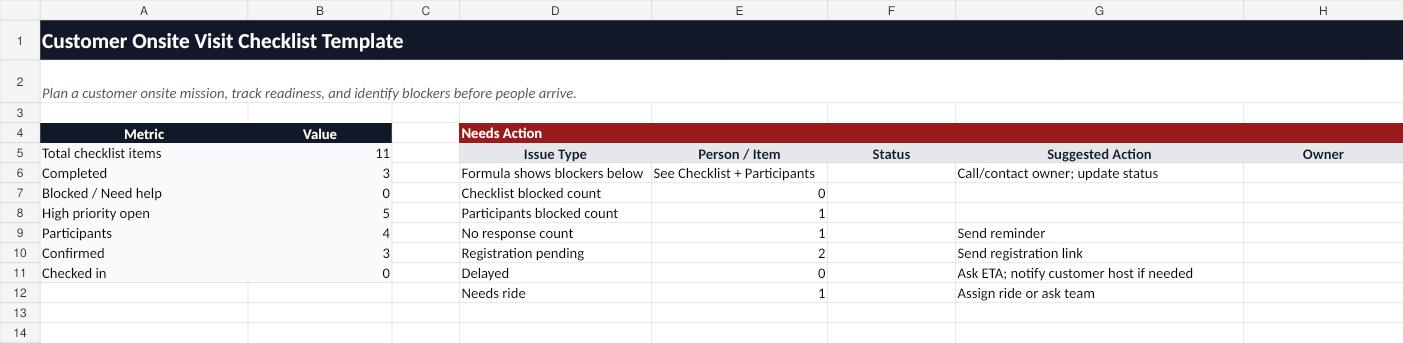
Use this free site visit checklist template for Excel to plan a customer site visit, coordinate participants, track visitor registration, and spot arrival issues before the meeting starts.
Who this Excel template is for
This template is for customer site visits where the visiting team includes people from different companies, teams, or locations.
It is useful for:
- Account executives coordinating a customer onsite meeting.
- Solution engineers bringing specialists or product experts.
- Implementation leads planning a field workshop.
- Vendor or partner managers coordinating external participants.
- Field teams that need a simple checklist before the visit goes live.
What is included in the workbook
The Excel workbook includes:
- Mission Info - site name, address, meeting point, required arrival time, meeting start time, customer host, and mission host.
- Checklist - owners, due dates, priorities, status, and next steps for each preparation task.
- Participants - names, companies, emails, attendance, ETA, visitor registration status, arrival status, and help notes.
- Dashboard - a quick summary of missing confirmations, incomplete registration, delayed people, and blocked issues.
- How to Use - guidance for planning with a spreadsheet and switching to a live mission board when needed.
Site visit checklist
Use this checklist before a customer visit:
- Confirm the site address and meeting point.
- Confirm the required arrival time and meeting start time.
- Identify the customer host and mission host.
- Add all participants and their email addresses.
- Send visitor registration instructions if required.
- Confirm who has read the site instructions.
- Track ETA and arrival status before the meeting.
- Flag anyone delayed, blocked, or needing help.
Copyable checklist table
| Item | Owner | Due | Status | Notes | | ---------------------- | ------------ | ------------- | ----------- | -------------------------------------- | | Confirm site address | Mission host | 5 days before | Not started | Include parking and lobby instructions | | Confirm customer host | Mission host | 5 days before | Not started | Add phone or email if appropriate | | Add participants | Mission host | 3 days before | Not started | Include vendors, partners, and experts | | Send registration link | Mission host | 3 days before | Not started | Only if required by the site | | Confirm attendance | Participants | 1 day before | Not started | Ask each person to confirm | | Submit ETA | Participants | Day of visit | Not started | Needed for live coordination | | Check in at site | Participants | Arrival time | Not started | Track delayed or blocked people |
When Excel is enough
An Excel checklist works well when:
- The site visit is simple.
- The same team attends every time.
- Everyone can update one shared spreadsheet.
- The host does not need live mobile check-in.
- There are no urgent security, parking, or registration issues.
When Excel starts to break down
A spreadsheet becomes harder to use when:
- Participants are external and should not edit the same file.
- The host needs status updates on a phone.
- Several people arrive separately.
- Someone is delayed or blocked at security.
- The host needs to remind people without starting a noisy group chat.
- The visit involves vendors, partners, or field specialists.
Use OnsiteMission when the visit goes live
Use the Excel template to plan the site visit. Use OnsiteMission when you need live readiness, arrival, check-in, and blocked-at-security tracking.
OnsiteMission gives each participant a private link to confirm attendance, submit ETA, read site instructions, and update day-of status without sharing full travel details.
FAQ
What is a site visit checklist template for Excel?
A site visit checklist template for Excel is a spreadsheet used to plan site details, participant readiness, visitor registration, ETA, arrival, check-in, and unresolved issues before a customer onsite visit.
Can I use this for a client site visit?
Yes. The template works for customer site visits, client onsite visits, field workshops, implementation visits, and multi-company onsite meetings.
Is this the same as visitor management software?
No. Visitor management software is usually owned by the customer site. This checklist is for the visiting team host who needs to coordinate participants before and during arrival.
When should I switch from Excel to OnsiteMission?
Switch when participants need to update their own status, the host needs a mobile-friendly dashboard, or delayed and blocked people need fast follow-up.